
How to Choose Inventory Management Software
That chaotic Saturday night scramble when you run out of a key ingredient isn't just stressful—it's a symptom of a deeper problem in your back-of-house. The right restaurant inventory management software gives you the data to prevent these emergencies, turning chaos into control. So, what’s the best choice? The honest answer from anyone who’s been in the trenches is this: it depends entirely on your restaurant's unique needs. This guide will help you cut through the options and find the perfect fit for your kitchen.
This guide is designed to give you the framework to find that perfect fit, starting with the core pillars you absolutely have to evaluate.
Is It Time to Ditch Spreadsheets for Inventory Control?
For far too many restaurants, inventory tracking is still stuck in the era of clipboards and painstakingly updated spreadsheets. It feels like a necessary evil, but it's a constant drain on your resources. This manual approach leads to all sorts of hidden costs, from food waste that eats into your profits to inaccurate Cost of Goods Sold (COGS) reports and valuable staff hours lost to tedious, mind-numbing counts.
Modern inventory software offers a real solution by automating these processes and, more importantly, turning raw data into information you can actually use.
The shift toward dedicated software isn't just a trend; it's a strategic move driven by the fierce competition we all face. The global market for this software, valued at around $2.5 billion in 2025, is expected to grow at a compound annual growth rate (CAGR) of 15% through 2033. This explosive growth shows just how desperately restaurants need to slash costs and boost efficiency, especially with food and labor prices on the rise. You can read the full market research about these industry shifts to get the bigger picture.
The Limits of Manual Tracking
If you're still relying on clipboards and spreadsheets for inventory, you know the drill. It feels like a necessary part of the job, but it's a constant drain on your resources. This old-school approach creates a ripple effect of hidden costs, from food waste that eats directly into your profits to inaccurate Cost of Goods Sold (COGS) reports that skew your financial picture. Beyond the numbers, it pulls your best people away from their main jobs, tying up valuable hours in tedious counts instead of letting them focus on creating an amazing guest experience.
These inefficiencies aren't just an administrative headache; they directly impact your kitchen's rhythm and your restaurant's bottom line. When your team is preoccupied with manual tracking, they have less time to focus on what really drives your business—crafting incredible dishes and providing top-notch service. Modern inventory management software offers a clear solution by automating these tasks. It turns raw data into actionable insights, helping you make smarter purchasing decisions that can improve your profit margins and operational flow.
What to Look for in Inventory Management Software
Making the right choice starts with a structured evaluation. Instead of getting lost in a sea of feature lists, I always tell operators to focus on three fundamental pillars that determine a system's true value to their specific operation. Think of these as your non-negotiables. They ensure you pick a tool that solves real problems, not just one with the most bells and whistles.
Operational Efficiency: Does the software actually make daily tasks easier? You're looking for things like barcode scanning for receiving, automated purchase order generation, and a solid mobile app for on-the-fly counts. The goal here is simple: reclaim hours for your team.
Financial Control: How does it protect your razor-thin margins? This is all about real-time food costing, variance reporting that flags discrepancies between what you should have used and what you actually used, and seamless POS integration to link every single sale to ingredient depletion.
Scalability and Support: Will this software grow with you, or will you outgrow it in a year? Consider multi-location management capabilities, robust integration options with your accounting and payroll systems, and access to reliable 24/7 customer support. Trust me, you'll need it eventually.
A great inventory system is more than a digital stock ledger; it's the financial command center for your kitchen. It translates raw data on onions and avocados into clear insights on menu profitability and operational waste.
Thinking through these areas first helps you create a shortlist of vendors that genuinely align with your business goals. It transforms your search from a confusing maze of options into a clear, methodical process, ultimately leading you to the best restaurant inventory management software for your kitchen.
To simplify this process, I've broken down these pillars into a quick-reference table. Use this as your compass while you navigate the different software options.
How to Approach Your Software Search
This table summarizes the core areas you must evaluate when choosing an inventory management system. Use this as a quick reference throughout your decision-making process.
| Evaluation Pillar | What to Look For | Why It Matters |
|---|---|---|
| Operational Efficiency | Mobile app access, barcode scanning, automated ordering, simple UI/UX. | Frees up your managers' and chefs' time from tedious manual counts so they can focus on guests and food quality. |
| Financial Control | Real-time COGS, recipe costing, waste tracking, variance reporting. | Gives you a crystal-clear view of your food costs and profitability, helping you protect your margins on every dish. |
| Integrations | Seamless connection to your POS, accounting software (QuickBooks, Xero), and suppliers. | Ensures data flows automatically between systems, eliminating manual data entry and reducing human error. |
| Scalability & Support | Multi-location features, robust reporting, 24/7 customer service. | Guarantees the software can grow with your business and that you have help when you inevitably run into an issue. |
Keep these pillars in mind as you start scheduling demos. They will help you cut through the sales pitches and focus on what truly matters for your restaurant's long-term success.
What Software Features Do You Actually Need?
A generic features list is just a wall of text until you connect it to the real chaos of a commercial kitchen. "POS Integration" sounds technical, but it’s what actually stops a server from selling the last salmon special that the kitchen just 86'd five minutes ago.
Let's break down the essential features of a great restaurant inventory management system and what they really do for your bottom line. Think of these not as checkboxes, but as tools. Each one is designed to solve a specific, often frustrating, problem that costs you money and time every single day.
Your Non-Negotiable Core Functions
These are the absolute fundamentals. Without them, you’re just paying for a glorified spreadsheet. These tools form the backbone of any system that's going to give you true financial control over your kitchen.
Real-Time Inventory Tracking: This is the heart of the system. Every time an ingredient is used in a sold dish, received from a supplier, or tossed as waste, the count updates instantly. No more guessing how many avocados you really have left before the weekend brunch rush hits.
POS and Accounting Integrations: This is all about making your data flow seamlessly. When your POS is connected, every sale automatically depletes the correct ingredients from your digital stockroom. An integration with your accounting software means your Cost of Goods Sold (COGS) is always current, wiping out hours of painful manual reconciliation.
Recipe and Menu Costing: This feature is where you uncover the true profitability of every single dish on your menu. You plug in the exact measurements and current cost for each ingredient in your signature burger, and the software calculates the precise plate cost. You can immediately see how a 10% jump in beef prices crushes your margin, letting you adjust pricing strategically instead of just guessing.
Purchase Order Management: It’s time to move beyond greasy clipboards and late-night texts to your suppliers. The system should let you create, send, and track purchase orders directly from the platform. The best ones will even auto-generate orders based on your par levels and sales forecasts, making sure you never run out of mission-critical items.
A good inventory system should tell you more than just what you have on the shelf. It needs to tell you what it’s worth, how fast it’s moving, and exactly when you need to order more. It turns your stockroom from a cost center into a data hub.
Barcode Scanning for Speed and Accuracy
Let's be honest, manual inventory counts are a soul-crushing task that nobody wants to do. They’re slow, tedious, and incredibly easy to mess up. A simple slip of the pen or a misread label can throw off your entire week's data. This is where barcode scanning completely changes the game. Instead of manually checking off items from a crumpled invoice during a chaotic delivery, your team can simply scan each box as it comes through the door. This technology, often using standardized barcodes, drastically reduces receiving time and virtually eliminates data entry errors, ensuring your starting inventory count is perfect. When your data is accurate from the very beginning, every report that follows—from food cost to variance—becomes infinitely more reliable. It’s a simple tool that builds a foundation of trust in your numbers.
Advanced Features That Improve Your Bottom Line
Once you've got the basics covered, the advanced features are what separate a good system from a great one. These are the tools designed to optimize your entire operation, slash hidden costs, and give you insights that were pretty much impossible to get before.
This is where you'll find the most significant return on your investment. Look for a system that moves beyond simple counting and helps you make smarter, forward-thinking decisions.
Managing Inventory Across Multiple Locations
For any restaurant group, this is an absolute must. A centralized dashboard lets you standardize recipes across all your locations, track inventory levels at each individual site, and manage purchasing from a single command center. It ensures brand consistency and lets you leverage your group's total buying power for better deals.
Handling Products with Multiple SKUs
Let's talk about a common headache: the same product having different names or codes. Your main supplier might call a case of Roma tomatoes 'TOM-R-25LB,' while a backup supplier lists it as 'RMTOM-CS.' This is where products with multiple stock keeping units (SKUs) can create chaos. Without a system to reconcile these differences, you risk ordering duplicates or thinking you're out of stock when you're not. It's a recipe for waste and inflated food costs.
The best inventory software solves this by letting you map multiple supplier SKUs to a single, internal item. This means that no matter what your invoice says, the software knows that 'TOM-R-25LB' and 'RMTOM-CS' are the exact same case of tomatoes. It keeps your counts accurate across all systems, from your POS to your ordering platform. This consistency is crucial for maintaining accurate stock levels and preventing costly errors, ensuring that when a dish is sold, the right ingredient is depleted, regardless of which supplier it came from.
Cutting Costs with Waste and Spoilage Tracking
This is so much more than just logging a dropped case of eggs. Dedicated waste tracking allows you to categorize your losses—think spoilage, over-portioning, or kitchen error—which helps you spot expensive patterns. Are you consistently tossing out a specific type of produce every week? This data gives you the hard evidence you need to adjust your par levels or refine staff training.
Using AI for Smarter Inventory Forecasting
This is where modern systems really shine. AI analytics can chew through your historical sales data, factor in seasonality, and even look at local events to predict future demand with impressive accuracy. These kinds of predictive forecasts can slash spoilage by 20-25% by preventing you from over-ordering perishable goods.
Some platforms even bundle in bonus tools that can further streamline kitchen tasks. For instance, look for software that offers a recipe finder with ingredients on hand—it's a brilliant way to create daily specials that use up excess inventory and turn potential waste into profit. By choosing a system with the right mix of core and advanced features, you're giving your restaurant the tools it needs not just to survive, but to truly thrive.
How to Choose the Right Software Vendor
A slick sales demo can make any software look like a magic bullet for your restaurant's problems. But let’s be honest, a polished presentation rarely shows you how the system will handle the messy, unpredictable reality of a dinner rush. Choosing a software partner requires digging much deeper.
Your evaluation needs to be a real investigation, not just a passive viewing experience. It starts by taking control of the demo. Don't let the salesperson stick to their script. Come armed with specific, real-world scenarios that trip you up today.
- "Show me exactly how the system handles a 'no onions' modifier on our signature burger. How does that adjust the inventory depletion for a whole onion versus a sliced onion?"
- "Walk me through a partial delivery. Our produce supplier shorted us on tomatoes yesterday. How do I log that against the original purchase order and track the credit?"
- "Let's see the mobile app. My chef needs to do a quick spot-check on high-cost items like ribeyes and top-shelf liquor. How fast can he do that from inside the walk-in?"
These kinds of questions force them to move beyond a generic feature list and prove the software can solve your actual problems. It's the difference between hearing a system has "robust reporting" and seeing exactly how to pull a variance report to figure out why your bar's liquor cost was 2% too high last week.
A Look at Top Inventory Management Software
Now that you know what to look for, let's explore some of the top players in the inventory management space. This isn't an exhaustive list, but it covers a range of solutions that excel in different areas, from warehouse management to mobile tracking. Think of this as a starting point to help you build your own shortlist of potential vendors to demo. Each one offers a unique approach, so the best fit will come down to your kitchen's specific challenges and goals. We'll look at options for overall operations, mobile-first tracking, and powerful integrations.
Best for Overall Operations: Katana and Odoo
For restaurants that need a powerful, all-in-one system to serve as the central hub for their operations, these two platforms are excellent contenders. They are built to handle complexity, from managing multiple storage locations to integrating a wide array of business tools. This makes them particularly suitable for established restaurants or growing hospitality groups that need a scalable solution to manage an increasingly complex back-of-house. They move beyond simple counting to offer a comprehensive view of your entire operation.
Katana: Ideal for Warehouse Management
If your operation involves multiple storage areas—like a main kitchen walk-in, a separate bar stockroom, and a dry goods pantry—Katana is a fantastic option. As Forbes Advisor notes, "Katana is a powerful inventory management software that excels in managing warehouses, tracking up to three locations for free, and offering unlimited product types (SKUs) on most plans." This is perfect for keeping tabs on everything from bulk ingredients in your main freezers to high-cost liquor in a locked cabinet, all from a single, unified dashboard.
Odoo: A Powerful Open-Source Option
Odoo stands out because it’s an open-source platform, which means it offers a high degree of customization if you have the technical resources. According to Forbes Advisor, "Odoo is an open-source inventory management software that combines many business tools into one system, offering a free inventory app with unlimited users and the ability to track storage spots with barcode scanning." The free inventory app is a huge plus for restaurants on a tight budget, allowing you to implement a robust system without a hefty upfront investment.
Best for Mobile and B2B Sales: Sortly and inFlow
For many restaurant managers, inventory happens on their feet, not at a desk. These mobile-first solutions are designed for the fast-paced reality of a busy kitchen where you need to do counts quickly and accurately from anywhere. They are also great for businesses that have a B2B component, such as a catering arm or wholesale distribution of house-made products. These platforms provide the specialized tools needed to manage sales and tracking beyond the dining room.
Sortly: Simple Mobile-First Tracking
Sortly is all about simplicity and ease of use, especially on a mobile device. The platform is designed for small businesses that need to track everything from ingredients to equipment without a steep learning curve. According to Sortly, its software is built to "help businesses manage their inventory," with a mobile app that even works offline. This is a game-changer for doing counts in a walk-in cooler or basement storage area where the Wi-Fi is notoriously spotty, ensuring your counts are always accurate.
inFlow: Great for Wholesale and B2B
If your restaurant also sells products wholesale—like bottled sauces or bulk baked goods—inFlow is built with you in mind. It includes features specifically for managing B2B sales, shipping, and barcoding. As inFlow explains, its software is "designed for small to mid-sized businesses" and simplifies the entire process from order to delivery. This helps you keep your restaurant and wholesale inventory separate but managed efficiently within one cohesive system.
Best for Integrations: Ordoro
In a modern restaurant, your inventory system can't be an island. It needs to communicate seamlessly with your POS, your accounting software, and your online ordering platforms. Ordoro shines in this area, acting as a central hub that connects all your other systems. Forbes Advisor highlights that "Ordoro connects with over 60 apps, tracks unlimited warehouses, and automatically updates stock levels across all sales channels." This level of integration ensures your data is consistent everywhere, eliminating the nightmare of manual data entry and reconciliation between different platforms.
Finding a System with a Free Plan or Trial
Before you sign a long-term contract, it's crucial to take any potential software for a test drive. The good news is that many vendors understand this and offer free trials or limited free plans. This is your chance to see how the system actually performs in your unique environment. As Forbes Advisor points out, "Many software options offer free trials, which is a great way to test them out before committing." Use this opportunity to have your chef, bar manager, and bookkeeper all use the platform to ensure it’s the right fit for everyone involved.
What to Ask Beyond the Sales Pitch
Once the demos are over, the real homework begins. Head over to third-party review sites like G2 and Capterra. This is where you'll find unfiltered feedback from other operators. Pay close attention to reviews from restaurants that are a similar size and concept to yours.
Look for patterns. If multiple users praise the "intuitive mobile app" or "responsive customer support," that's a great sign. On the other hand, if you see repeated complaints about "clunky reporting" or "frequent bugs after updates," consider it a red flag.
Your goal isn't just to find a great piece of software; it's to find a reliable long-term partner. A vendor's post-sale support and commitment to their clients are just as important as the features they offer.
Another non-negotiable step is to ask for reference calls. Any vendor worth their salt should be happy to connect you with a few current clients running businesses similar to yours. This is your chance to ask the tough questions you couldn't ask the sales rep. In a way, it’s similar to evaluating internet telephone service providers; you're looking for proof of reliability and support from real users.
Making the Final Call: A Simple Framework
To avoid making a decision based on emotion or a gut feeling, you need a way to compare your top contenders side-by-side. A simple comparison checklist is perfect for this. It forces you to score each vendor on the same criteria, giving you a clear, data-driven picture.
I’ve put together a simple table you can use to structure your evaluation. Just score each vendor on a scale of 1-5 for the criteria that matter most to you.
Your Software Vendor Comparison Checklist
| Feature/Criteria | Vendor A Score (1-5) | Vendor B Score (1-5) | Vendor C Score (1-5) | Notes |
|---|---|---|---|---|
| Ease of Use | How intuitive is the interface? | |||
| POS Integration Quality | Does it sync seamlessly? | |||
| Mobile App Functionality | Can you manage key tasks on the go? | |||
| Reporting & Analytics | Are the reports detailed and useful? | |||
| Customer Support | Based on reviews and reference calls. | |||
| Multi-Location Features | If applicable to your business. | |||
| Pricing & Total Cost | Includes setup, monthly fees, etc. | |||
| Overall Fit for My Restaurant | A final gut-check score. |
This process helps you step back and look at the whole picture, ensuring you choose the software that truly fits your operational needs and budget.
This decision tree can also help you frame your thinking, especially when it comes to must-have features.
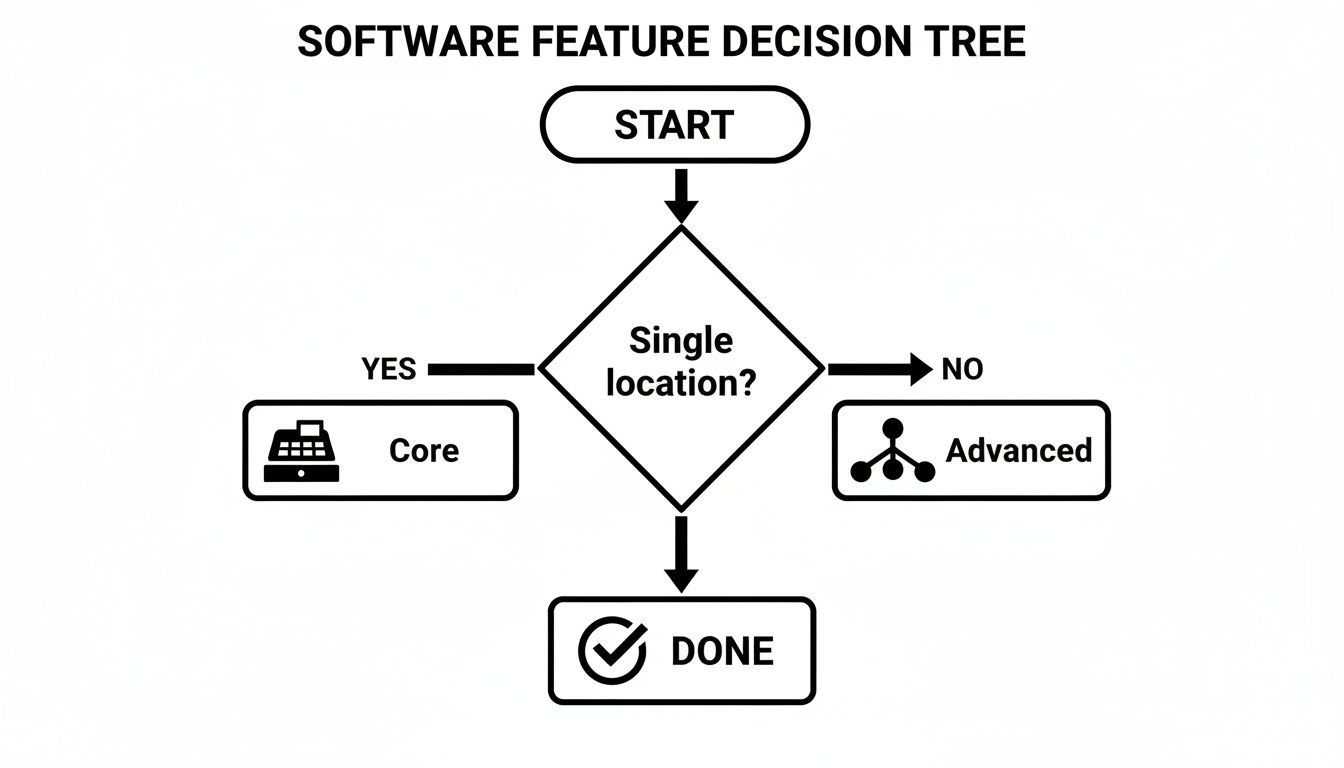
It’s a great visual for clarifying whether you need a core system for a single spot or more advanced features to manage a multi-unit group.
Ultimately, the vendor you choose becomes a core part of your operation, directly tied to your financial health and day-to-day efficiency. A thorough evaluation also means seeing how this new tool fits into your broader operational ecosystem. To get a better sense of that, it's worth exploring how inventory management connects to your entire restaurant supply chain. By being methodical and asking the right questions, you can cut through the marketing hype and find a partner that will genuinely help your restaurant succeed.
What's the True Cost? Calculating Your ROI
Let's talk about the real price tag of a new inventory management system. It's easy to get focused on the monthly subscription fee you see on the pricing page, but that's only one piece of the puzzle. To make a smart financial decision, you need to look at the Total Cost of Ownership (TCO). This gives you the full picture of what it'll actually take to get the software up, running, and working for you.
Thinking about the TCO prevents those nasty budget surprises down the road. It’s about being realistic and accounting for everything from the get-go.

Don't Forget These Hidden Costs
Before you can figure out your return, you need an honest look at your investment. Beyond that recurring software license, your total cost will probably include a few other things:
- One-Time Setup and Implementation Fees: A lot of vendors charge a fee to get your system configured, help with the initial data import, and walk you through the setup.
- Data Migration Costs: If you're moving from an old system or a jungle of spreadsheets, there might be a cost to get all that historical data moved over correctly.
- Hardware Investments: Think about what you'll need on the ground. Will you need new tablets for the kitchen, barcode scanners for receiving deliveries, or updated devices at your POS stations to run everything smoothly?
- Staff Training Time: This isn't a direct cash expense, but the hours your team spends learning a new system are a very real labor cost.
Adding these up gives you a true, all-in number for your initial investment. Only then can you start to accurately project your Return on Investment (ROI).
Hardware Needs: Scanners, Printers, and More
Your new software is the brain of the operation, but it needs hands and eyes to function in the real world of your stockroom and kitchen. This is where hardware costs come into play. A simple handheld barcode scanner can transform the tedious process of receiving deliveries or performing weekly counts into a quick, accurate task, drastically reducing human error. When you pair scanners with label printers, you can create custom barcodes for shelving or prepped items, ensuring every component is tracked correctly from delivery to depletion. Don't forget about reliable thermal printers for the line, which are critical for generating clear kitchen tickets that keep the workflow smooth during a busy service. These tools aren't just add-on expenses; they are essential investments that directly support the accuracy and efficiency gains you expect from the software itself.
How to Calculate Your Potential ROI
Calculating your ROI isn’t just pulling numbers out of thin air; it’s about putting a dollar value on real operational improvements. The financial upside can be huge, turning what looks like a monthly expense into a powerful tool that drives revenue. In my experience, a mid-sized restaurant can save as much as $50,000 a year on inventory alone by cutting down on spoilage and over-ordering.
Let's model a few scenarios to see what that could look like for you:
- Reduced Food Waste: Take 5% of your current monthly food spend. A good system can easily help you hit that number by tightening up your ordering and tracking waste. If you're spending $30,000/month on food, that’s an immediate $1,500 back in your pocket every month.
- Labor Hour Savings: How many hours do your managers or chefs spend on manual counts and placing orders each week? If the software automates those tasks and saves them just 5 hours per week at an average rate of $25/hour, you’re saving another $500 per month in labor.
- Improved Menu Profitability: This is where things get really interesting. Accurate recipe costing is a game-changer. By seeing which menu items are your most profitable and promoting them (or re-engineering the ones that aren't), you can realistically boost your overall profitability by 1-2%. Understanding your restaurant food cost percentage is the first step here.
By combining these tangible savings, you build a clear financial case for the investment. You’re not just buying software; you’re investing in a system designed to protect your margins and boost your bottom line.
Your Step-by-Step Implementation Plan
You’ve picked your new restaurant inventory management software. That’s a huge step, but the real work starts now. A successful rollout hinges entirely on your implementation plan. Trust me, just flipping the switch without a clear roadmap is a recipe for chaos, team frustration, and—worst of all—inaccurate data that completely undermines your investment.
A solid plan turns what could be a chaotic scramble into a strategic project that gets your whole team on board and excited for the change.
The best way to tackle this is to break it down into manageable phases. Think of it like prepping a complex dish—each component needs to be ready before you can bring it all together. The goal is to move methodically from getting your data right to full team adoption, sidestepping the common pitfalls I’ve seen trip up countless other restaurants.
Step 1: Getting Your Data Ready for Migration
This is where the real grunt work happens, and underestimating it is a classic, costly mistake. Your new software is only as good as the information you feed it, so getting this right is non-negotiable. Don't try to boil the ocean; tackle it in focused, manageable chunks.
Here’s what your core data prep will involve:
- Supplier Lists: Compile a master list of all your vendors. You'll need their contact info, product codes, and standard pricing. Get this organized now, and you'll save hours later.
- Ingredient and Recipe Entry: This is the big one. Every single ingredient needs to be entered with its purchase unit (e.g., case of bell peppers) and its usage unit (e.g., grams of diced bell pepper). Then, you have to build out every single recipe, sub-recipe, and modifier with precise measurements.
- Opening Stock Count: Right before you go live, you need a full, wall-to-wall physical inventory count. This "Day Zero" count is what establishes your starting point in the new system. It has to be accurate.
Pro Tip: Don't even think about building every recipe from memory. Print out your current menu and work through it item by item. Better yet, pull in the chefs who know these dishes inside and out. It ensures accuracy and, just as importantly, gets early buy-in from your kitchen leaders.
Step 2: Setting Up the System and Training Your Team
Once your data is loaded, it’s time to configure the system's rules and automations. This is where you set the parameters that will actually save you time and money down the line. Start by setting initial par levels for your key ingredients and configuring low-stock alerts that ping your managers before you run out of a critical item.
With the system configured, training becomes your absolute priority. The goal here isn't just to show people which buttons to click; it’s about communicating the "why" behind this big change. Explain how the software will make their jobs easier—less time counting inventory, fewer 86'd items, and clearer insight into how the restaurant is performing.
To make sure the transition is smooth, here’s what I recommend:
- Appoint a "System Champion": Find that one tech-savvy, respected person on your team—maybe a lead line cook or your bar manager—and make them the go-to expert. They can help answer quick questions on the fly and build enthusiasm among their peers.
- Create Simple Cheat Sheets: Nobody is going to read a 50-page manual. Develop one-page guides for the most common daily tasks: receiving an order, logging waste, or performing a spot count. Laminate them and stick them in the kitchen or office. They work wonders.
- Run a Parallel Test: If you can swing it, run your old system (even if it's just spreadsheets) alongside the new software for a week. This lets you catch discrepancies and builds confidence across the team before you make the final cutover.
Ultimately, this level of automation frees up your managers to focus on what really matters: your guests and your team. In an industry where staff replacement costs can climb to $1,491 for a single back-of-house employee, retaining talent by improving their work environment is a massive financial win. You can find more insights on how automation impacts restaurant operations at ResearchAndMarkets.com.
How to Measure Success After Launch
Flipping the switch on your new inventory software isn't the finish line; it’s really just the starting line. The true value comes from turning all that fresh data into smarter, more profitable decisions for your restaurant.
This is where your investment starts to pay off. You’re moving beyond simple tracking and turning your inventory system into the financial command center of your business. To see if it's working, you'll want to keep a close eye on a handful of key performance indicators (KPIs). These numbers, now right at your fingertips, tell the real story of your kitchen's health.
Which KPIs Should You Be Tracking?
To start, zero in on three critical numbers that have a direct impact on your bottom line. These aren't just abstract figures; they are the pulse of your kitchen's efficiency and profitability.
Food Cost Percentage: This is the big one. Your software should give you a real-time food cost percentage by comparing your cost of goods sold (COGS) to your revenue. A healthy benchmark is typically 28-35%, but what's really important is tracking the trend. If you see that number creeping up, you can immediately dig in to see if a supplier raised prices or if your portioning on the line is getting a little loose.
Inventory Turnover Rate: This KPI tells you exactly how quickly you're selling through your stock. A high turnover is generally a good thing—it means your cash isn't just sitting on a shelf. If you notice a low turnover rate for certain items, it might be a red flag for over-ordering or a sign that a particular menu item just isn't moving and needs a rethink.
By actively monitoring these KPIs, you shift from putting out fires to proactively managing your finances. The data doesn't just report on the past; it gives you a clear roadmap for improving the future.
Finding Actionable Insights in Your New Data
Beyond those top-line numbers, your software is a goldmine of granular reports that can uncover hidden problems you didn't even know you had.
Variance reports are especially powerful. They show you the gap between the inventory you should have based on sales (theoretical) and what you actually have after a physical count (actual). A high variance is a huge red flag that can pinpoint issues like over-portioning, unrecorded waste, or even theft.
Waste reports are another treasure trove of information. When you start seeing a pattern—like the same ingredients being logged as spoiled week after week—you finally have the hard data you need for reducing food waste in restaurants. This kind of insight lets you tweak your par levels or get creative with the menu to use up ingredients before they expire.
On top of all this, compliance is becoming a bigger deal every day. Regulations on food safety and traceability are pushing restaurants to be more diligent than ever. Modern software builds in robust reporting to help you meet these standards and sidestep hefty fines. You can learn more about these regulatory trends and their impact on software development. This transforms your system from a simple cost-saving tool into an essential asset for managing risk.
Answering Your Top Questions
Making the leap to new software always brings up a few questions. Let's tackle some of the most common ones I hear from restaurant owners, so you can move forward with confidence and sidestep some of the usual bumps in the road.
How Long Does This Whole Implementation Process Take?
It really depends, but for a single restaurant, you should probably budget anywhere from two to six weeks. That timeframe covers everything from getting your data into the system and configuring it just right, to training your team.
Honestly, the biggest time sink is almost always the initial data prep. We're talking about gathering all your supplier lists and meticulously entering every single ingredient and recipe. It's tedious, but getting it right is crucial.
If you’re rolling this out across multiple locations, it's obviously going to take longer since you're repeating the process for each spot. The temptation is to rush, but that's a classic mistake. A slow, methodical setup now will save you from massive data headaches down the line. Trust me on that one.
How Can I Be Sure It Will Actually Work With My POS System?
This is a big one, and you're right to be focused on it. A smooth integration with your point-of-sale system isn't just a "nice-to-have"—it's a dealbreaker.
When you're evaluating different options, don't just take the salesperson's word for it. You need to see it in action. Ask for a live demo where they show you exactly how a sale at the POS terminal depletes inventory in the software, in real time.
My Pro Tip: Get really specific with your questions. Ask something like, "Can you show me how a menu item modifier, like 'no onions,' syncs between the POS and the inventory count?" A truly integrated system handles these little complexities automatically. Vague answers are a red flag. Also, look for official partnerships with your POS provider—that usually means a much more stable and reliable connection.
What’s the Single Biggest Mistake to Avoid During the Rollout?
Hands down, the biggest mistake I see is not training the staff properly. You can spend a fortune on the best restaurant inventory management software out there, but it’s worthless if your team doesn't know how to use it, or worse, why they should use it.
When training falls short, you get inconsistent data entry, which makes all your fancy reports completely unreliable. Your investment goes right out the window.
To get this right, here’s what I recommend:
- Find your champion: Pick one person on your team who is a little more tech-savvy and make them the go-to expert.
- Create simple cheat sheets: Nobody is going to read a 50-page manual. Make simple, one-page guides for the most common daily tasks, like receiving an order or logging waste.
- Explain the "why": Don't just show them what to do. Explain how this new tool makes their jobs easier and the restaurant more successful. Frame it as a benefit, not just another chore. A little context goes a long way in getting everyone on board from day one.
At The Restaurant Warehouse, we understand that having the right tools is crucial for success. From walk-in coolers to the worktables where your team preps every dish, we provide the high-quality equipment that forms the backbone of your operation. Equip your kitchen for maximum efficiency by exploring our extensive catalog at https://therestaurantwarehouse.com.
Key Takeaways
- Define your core needs before you look at features: Pinpoint your biggest operational and financial challenges first. This ensures you choose a system that solves real problems, like controlling food costs and saving labor hours, rather than one with the most bells and whistles.
- Plan your rollout as carefully as you choose your vendor: A successful launch depends on clean data and a well-trained team. Dedicate time to organizing your recipes and supplier info beforehand, and focus on teaching your staff why the new system helps them.
- Treat your inventory system as your kitchen's financial hub: Go beyond simple stock counts. Regularly use your software's reports to track key metrics like food cost percentage and inventory turnover to make smarter purchasing decisions and improve menu profitability.
Related Articles
About The Author

Sean Kearney
Sean Kearney used to work at Amazon.com and started The Restaurant Warehouse. He has more than 10 years of experience in restaurant equipment and supplies. He graduated from the University of Washington in 1993. He earned a BA in business and marketing. He also played linebacker for the Huskies football team. He helps restaurants find equipment at a fair price and offers financing options. You can connect with Sean on LinkedIn or Facebook.
Leave a comment